


Fiber Laser vs CO2 Laser: Which Is Best for Metal, Signage, and Your Business?
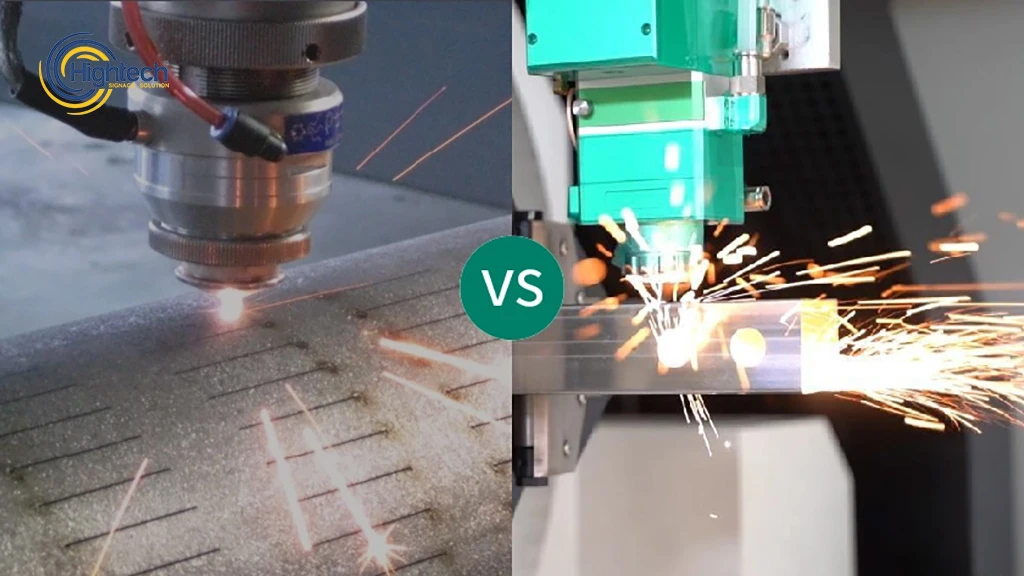
Table of Contents
Choosing between a fiber laser and a CO2 laser is not simply a question of which technology is newer or more powerful. The correct choice depends on the materials you process, the quality your customers expect, your production volume, and the jobs you want to add to your business.
Fiber lasers are optimized for metal. They are widely used for stainless steel, mild steel, aluminum, brass, copper, titanium, and other metal applications where speed, narrow kerfs, consistent detail, and low optical maintenance are important. CO2 lasers are strongest on non-metal materials such as acrylic, wood, MDF, leather, fabric, paper, and selected plastics. They remain a practical choice for sign shops and mixed-material workshops that depend on clean acrylic edges and detailed engraving.
For many companies, the decision is therefore not “Which laser is better?” but “Which laser matches the work that generates most of our revenue?” This guide compares fiber and CO2 systems for industrial metal cutting, signage, material quality, maintenance, operating cost, and return on investment.
Quick answer
Choose a fiber laser when most of your work involves metal, especially thin and medium-gauge sheet, reflective metals, metal letters, plaques, components, or high-volume production. Choose a CO2 laser when most of your work involves acrylic, wood, MDF, fabric, paper, or other non-metals. A sign shop with a balanced mix of metal and non-metal work may eventually need both technologies.
Fiber Laser vs CO2 Laser: Technical Comparison
Factor | Fiber Laser | CO2 Laser |
|---|---|---|
Typical wavelength | About 1.06 µm | About 10.6 µm |
Best material match | Metals | Acrylic, wood and other non-metals |
Beam delivery | Fiber-optic delivery | Mirror-and-lens beam path |
Reflective metals | Well suited when properly configured | Generally unsuitable for bare copper and brass |
Acrylic cutting | Not a practical cutting process | Excellent, often with a glossy cut edge |
Metal cutting speed | Usually faster on thin and medium sheet | Usually slower and less efficient for modern metal production |
Optical maintenance | Low | Mirrors and optics require inspection and alignment |
Typical buyer | Metal fabricator or metal-sign producer | Sign shop, engraving business or mixed non-metal workshop |
CO2 Fiber Laser: Why the Difference Matters in Industry
Many buyers search for “CO2 fiber laser” because they want to compare both systems before investing. Technically, CO2 lasers and fiber lasers are two different laser technologies. CO₂ lasers use a gas-based laser source and are highly effective for acrylic, wood, MDF, leather, paper, fabric, and selected plastics. Fiber lasers use a solid-state source and fiber beam delivery, making them better suited for metal cutting and metal engraving.
In industry, the right choice depends on the material. For metal cutting, high-power fiber lasers are usually preferred because they process stainless steel, aluminum, brass, copper, and other metals with higher speed and efficiency. For signage businesses that depend on acrylic, wood, and non-metal materials, CO2 lasers remain extremely valuable.
Why Wavelength Changes Material Performance
The most important difference between fiber and CO2 lasers is wavelength. Metals absorb the shorter wavelength of a fiber laser more efficiently, while many organic and non-metal materials absorb the longer CO2 wavelength more effectively. This material response influences cutting speed, edge quality, energy use, safety, and the type of work each machine can perform reliably.
Fiber Laser: Short Wavelength for Metal Absorption
A fiber laser operates at approximately 1.06 µm. Stainless steel, mild steel, aluminum, titanium, brass, and copper can absorb this wavelength efficiently when the machine and cutting process are correctly configured. More of the delivered energy contributes to melting or vaporizing the metal, supporting fast piercing, narrow kerfs, detailed contours, and high throughput.
CO2 Laser: Strong Performance on Acrylic and Organic Materials
A CO2 laser operates at approximately 10.6 µm. Acrylic, wood, MDF, leather, fabric, paper, rubber, and many other non-metal materials respond well to this wavelength. The technology can cut profiles, engrave text and graphics, and process a broad mix of substrates without physical tool contact.
Beam Delivery and Maintenance
Fiber lasers use a solid-state source and fiber-optic beam delivery. CO2 systems use a gas-based source and an optical path that normally includes mirrors and lenses. The CO2 design can require more routine optical cleaning and alignment, while fiber systems generally have fewer optical components in the beam-delivery path. Maintenance requirements still vary by machine design, working environment, extraction system, and daily operating hours.
Fiber Laser vs CO2 Laser for Metal Cutting
For most new metal-cutting investments, fiber technology is the stronger choice. It is designed for fast processing of metal sheet and plate, supports reflective materials more effectively, and usually offers lower optical maintenance. CO2 machines may remain productive in established lines, but businesses buying new equipment should compare cost per finished part rather than relying only on purchase price or rated laser power.
Stainless Steel and Aluminum Precision
Fiber lasers can focus to a small spot, which supports narrow kerfs, small holes, fine contours, and repeatable dimensions on thin and medium-gauge stainless steel and aluminum. These capabilities are valuable for enclosures, machine parts, decorative panels, kitchen equipment, mounting plates, metal letters, and architectural components. Assist-gas selection, nozzle condition, focal position, machine motion, and cutting parameters still determine the final edge quality.
Copper, Brass, and Other Reflective Metals
Copper and brass reflect the CO2 wavelength strongly, which makes bare reflective metals difficult and potentially risky for many CO2 systems. Fiber machines designed for these materials are the practical option for direct cutting and marking. Buyers should nevertheless confirm that the selected machine, source, cutting head, and process settings are approved for the exact metal grade and thickness.
Thin Sheet, Medium Plate, and Thick Material
Fiber lasers generally deliver their largest productivity advantage on thin and medium sheet, where faster acceleration, piercing, and cutting can increase daily output. Older CO2 processes were historically valued for smooth edges on some thick mild-steel applications. Modern high-power fiber systems have narrowed many of those differences, so sample cuts should be evaluated using the buyer’s real material grades, thicknesses, gas supply, and quality requirements.
Marking and Engraving on Metal
Fiber technology is also well suited to fine metal marking and engraving. It can produce serial numbers, QR codes, logos, identification plates, control-panel labels, and industrial branding with high contrast and fine detail. A dedicated fiber marking machine may be more appropriate than a cutting system when the main requirement is surface marking rather than cutting sheet metal.
Does Fiber Laser Harden Metal Edges?
Fiber laser cutting can create localized thermal changes at the cut edge, especially on stainless steel and other metals, but it does not always mean the edge becomes severely hardened. Edge hardening depends on the metal grade, laser power, cutting speed, assist gas, heat input, cooling rate, and material thickness.
For stainless steel, many users search for fiber laser vs CO2 stainless steel edge hardening because edge quality is important for precision parts, bending, welding, finishing, and assembly. In most modern fiber laser cutting applications, the heat-affected area is narrow because the beam is highly focused and the cutting process is fast. This helps reduce distortion and limits thermal impact compared with slower or higher-heat processes.
However, if the parameters are not optimized, fiber laser cutting may cause discoloration, rough edges, oxide layers, or changes in edge hardness. This is why fiber laser vs CO2 laser edge hardening stainless steel should not be judged only by laser type. The final result depends on machine quality, assist gas, focal position, material thickness, and cutting parameters.
Fiber Laser vs CO2 Laser for Signage
Signage is a mixed-material industry, so the correct laser depends on the shop’s product mix. Acrylic faces, illuminated channel letters, wood signs, stainless-steel letters, aluminum panels, brass plaques, and industrial labels do not respond to the same wavelength. The most profitable machine is the one that matches the material categories the shop processes every day.
Acrylic Faces and Illuminated Channel Letters: Why CO2 Wins
CO2 lasers are the practical choice for acrylic sign components. During cutting, the beam melts the cut face in a controlled way and can leave a smooth, glossy edge that often requires little or no secondary polishing. This is especially useful for illuminated acrylic faces and edge-lit signs, where a clean edge improves the visual quality of the finished product.
A fiber laser is not a substitute for this workflow because acrylic does not absorb the fiber wavelength in the same useful way. Increasing fiber-laser power does not turn it into an acrylic-cutting system. Shops that rely on channel-letter faces, acrylic logos, display components, or illuminated panels should treat a CO2 machine as a core production tool.
Wood, MDF, Plastics, and Layered Signage
CO2 machines also support cutting and engraving on wood, MDF, plywood, laminates, leather, fabric, paper, and selected plastics. A sign shop can use one system for rustic storefront signs, dimensional letters, layered plaques, decorative panels, templates, and customized graphics. Material safety should always be confirmed before processing coated, laminated, or chemically treated products, because some materials can release hazardous fumes or damage equipment.
Metal Storefront Letters, Aluminum Panels, and Brass Plaques: Why Fiber Wins
When the work moves to stainless steel, aluminum, brass, or copper, the advantage shifts to fiber. Fiber lasers can cut metal letters, logos, mounting plates, decorative panels, nameplates, and structural sign components directly. They also maintain fine detail on small text and intricate shapes, which is valuable for plaques, directories, industrial signage, and dimensional metal branding.
The speed advantage becomes commercially important on repeat production. Faster metal processing can increase the number of jobs completed per shift, while consistent kerf width and repeatable dimensions can reduce fitting and finishing time. Thin signage metal can be sensitive to vibration and heat, so machine rigidity, motion control, nesting, assist gas, and parameter setup remain important.
Best Laser for Common Sign Materials
Sign material or product | Recommended technology | Reason |
|---|---|---|
Cast-acrylic letters and faces | CO2 laser | Clean cutting and a glossy edge suitable for illuminated signage |
| Wood, MDF, plywood and layered plaques | CO2 laser | Cuts and engraves organic materials effectively |
| Fabric, paper and selected plastics | CO2 laser | Broad non-metal material compatibility |
| Stainless-steel storefront letters | Fiber laser | Fast metal cutting with fine detail and repeatability |
| Aluminum panels and mounting plates | Fiber laser | Efficient absorption and accurate metal processing |
| Brass plaques and metal nameplates | Fiber laser | Direct cutting or marking with permanent detail |
| Mixed acrylic and metal signage | Both, or phased investment | Each technology handles a different part of the workflow |
How a Mixed-Material Sign Shop Should Invest
A new sign shop does not always need to purchase both technologies immediately. The first machine should match the material group that produces the largest share of current and near-term revenue:
- Mostly acrylic faces, channel letters, wood, and display work: start with CO2.
- Mostly stainless-steel letters, aluminum components, plaques, and industrial signs: start with fiber.
- Mixed work with more non-metal demand: buy CO2 first and add fiber as metal orders grow.
- Mixed work with more metal demand: buy fiber first and add CO2 when acrylic and wood volume justifies it.
Outsourcing the smaller material category can be a sensible temporary strategy. The shop should track the revenue and margin lost to outsourcing, then compare that amount with the monthly ownership cost of a second machine.
Operating Cost, Maintenance, and ROI
Purchase price is only one part of the investment. A useful comparison includes electricity, assist gas, extraction, cooling, consumables, optics, planned maintenance, unplanned downtime, labor, and the value of jobs the machine makes possible.
Why Fiber Often Costs Less to Operate for Metal
Fiber laser sources generally provide higher electrical efficiency and require less optical-path maintenance than comparable CO2 metal-cutting systems. For a metal-focused operation running multiple shifts, the difference in electricity, optics, maintenance time, and throughput can have a major effect on cost per part. The actual savings depend on laser power, duty cycle, local energy prices, assist-gas consumption, and machine configuration.
Why CO2 Can Still Be the Better Business Purchase
A lower-cost machine that performs the shop’s core work is often a better investment than a more advanced machine that cannot process the required materials. For a business producing acrylic signs, wood products, engraved gifts, displays, or fabric components, CO2 technology may generate revenue immediately and eliminate manual finishing. Its higher maintenance needs should be included in the budget, but they do not outweigh the material advantage when non-metals are the main workload.
Fiber Laser vs CO2 Laser Cost
When comparing fiber laser vs CO2 laser cost, the purchase price is only one part of the decision. A CO2 laser may have a lower entry cost, especially for acrylic, wood, leather, paper, and mixed non-metal production. This makes it attractive for sign shops, engraving businesses, and workshops that need flexible non-metal processing.
A fiber laser cutting machine is usually more expensive at the beginning, especially when configured for industrial metal cutting. However, for metal-focused businesses, fiber lasers often deliver lower long-term cost per part because they cut metal sheets faster, require less optical alignment, and provide higher efficiency on stainless steel, mild steel, aluminum, brass, and copper.
So, why is it so expensive? The higher cost usually comes from the fiber laser source, cutting head, motion system, safety enclosure, automation options, gas system, and the precision required for high-power fiber lasers. For businesses working mainly with metal, that higher investment can be justified by faster throughput, lower maintenance, and better productivity.
In simple terms: choose CO2 when your revenue comes from non-metal materials, and choose fiber when your business depends on metal cutting, stainless steel precision, industrial fabrication, or high-volume sheet metal production.
Decision Matrix: Which Laser Suits Your Business?
Business profile | Primary materials | Recommended first machine | Reason |
|---|---|---|---|
| Industrial metal fabricator | Steel, stainless, aluminum, brass, copper | Fiber laser | Metal speed, reflective-metal capability and lower optical maintenance |
| Metal-sign producer | Metal letters, panels, plaques, mounting parts | Fiber laser | Detailed direct processing of thin signage metal |
| Acrylic and illuminated-sign shop | Acrylic, plastics, channel-letter faces | CO2 laser | Clean acrylic cutting and polished-looking edges |
| Wood and engraving business | Wood, MDF, leather, paper, fabric | CO2 laser | Broad organic-material cutting and engraving |
| Mixed sign shop, mostly non-metal | Acrylic and wood with occasional metal | CO2 first | Supports the dominant workload; outsource metal initially |
| Mixed sign shop, mostly metal | Metal with occasional acrylic or wood | Fiber first | Supports the dominant workload; outsource non-metal initially |
| Diversified, high-volume sign factory | Metal and non-metal in meaningful volume | Fiber + CO2 | Dedicated technologies improve quality and workflow for each material group |
Choose a Fiber Laser If...
- Most of your revenue comes from metal cutting, fabrication, or metal signage.
- You regularly process stainless steel, mild steel, aluminum, brass, or copper.
- Thin- and medium-sheet speed is important to throughput.
- You need direct metal marking, detailed logos, serial numbers, or nameplates.
- Lower optical maintenance and predictable uptime are purchasing priorities.
Choose a CO2 Laser If...
- Your main materials are acrylic, wood, MDF, leather, fabric, paper, or selected plastics.
- You produce illuminated signs, channel-letter faces, displays, or engraved non-metal products.
- A glossy acrylic edge and detailed wood engraving are central to product quality.
- You need one machine for a broad variety of non-metal substrates.
- The lower entry cost aligns better with your current production volume and sales pipeline.
Find the Right Machine for Your Application
Frequently Asked Questions
Which laser is better for stainless steel?
A fiber laser is generally the better choice for stainless steel because the metal absorbs its wavelength efficiently. It supports fast cutting, narrow kerfs, fine contours, and direct marking. Final quality depends on power, sheet thickness, assist gas, focus, nozzle condition, and machine accuracy.
Can a fiber laser cut acrylic or wood?
Not as a practical production process. Acrylic, wood, and similar non-metals respond far better to a CO2 laser. A sign shop producing acrylic faces, wood signs, or engraved organic materials should use CO2 technology.
Which laser is best for acrylic signs and channel letters?
A CO2 laser is the correct choice for cutting acrylic sign faces. It can produce a smooth, glossy cut edge that is well suited to illuminated signs and channel-letter applications.
Which laser is best for metal storefront letters and brass plaques?
A fiber laser is the stronger choice. It can cut or mark stainless steel, aluminum, brass, and other metals directly while maintaining fine text, logos, and repeatable dimensions.
Can one machine handle every sign material?
No single laser performs equally well on metals and non-metals. A mixed-material shop can begin with the machine that matches its dominant workload, outsource the smaller category, and add the second technology when order volume justifies it.
Does a fiber laser have lower maintenance?
Is fiber always more profitable than CO2?
No. Profitability depends on material mix and sales demand. Fiber is usually more economical for metal-heavy production, while CO2 can be the more profitable purchase for acrylic, wood, and other non-metal products.
How should I compare ROI?
Use your own job prices, expected monthly volume, gross margin, energy and gas costs, maintenance budget, finance cost, and the value of work currently outsourced. Compare conservative and realistic scenarios before purchasing.
Latest contents


Prefer a callback? Share your details and requirements below.
Your details will only be used to respond to this request.